- KPIs
- SPI, CPI, CV and SV
- Change requests
- Weekly report
- Risk assessment
Built by Vetray
For PMO and project teams
We were inspired by this saying
“A dashboard should help people make decisions, not make them work harder to understand data.”
One view of KPIs and earned value across your projects.
KPIs for scope, budget and schedule, with SPI, CPI, CV and SV calculated for you. Risks, change requests, meetings and the weekly report sit in the same place.


SPI, CPI, CV and SV, calculated for you
PAD calculates earned value from your budget phases and planned dates, so you read schedule and cost performance at a glance.
SPI
Schedule performance index: earned value divided by planned value. Below 1.00 the project is behind schedule.
CPI
Cost performance index: earned value divided by actual cost. Below 1.00 the project is over budget.
CV
Cost variance: earned value minus actual cost. A negative value means over budget.
SV
Schedule variance: earned value minus planned value. A negative value means behind schedule.
What PAD does for you
The advantages and conveniences you get when you run your projects in PAD.
See project health at a glance
Scope, budget and schedule KPIs sit on one screen. SPI, CPI, CV and SV are calculated for you, so you stop rebuilding them in a spreadsheet every week.
Know your risks before they hurt
Rate probability and impact from 1 to 5 and the risk matrix shows what needs your attention first.
Keep your existing schedule
Import milestones from Primavera P6 (XER or XML) and SAP-PM Excel or CSV files, and export them again when you need to.
Give each person the right view
Add someone to a project with an invite link and their role sets what they see. Your customer sees progress, your procurement lead sees budget, and you can change any role at any time.
Meetings and documents in one place
Record meetings, and keep documents and suppliers in a shared library that every project member can open.
A weekly report without the extra work
The weekly status report is built from the project data you already keep, ready to share with sponsors and customers.
More advantages
Keep your budget private
Budget figures are visible only to the Project Manager, System Engineer, Budget Owner and Customer. Anyone else can request access from the Project Manager.
Bring people in with a project code
A team member joins with a project code and the Project Manager approves. A project can have up to 7 members at no cost.
Work with partner companies
Send a file to another project you belong to, or run joint projects where two companies keep their own team, files and storage.
On your computer and your phone
Use PAD in the browser or as an Android app, so your project is with you in meetings and on site.
Your data stays yours
Every user can export their data and delete their account and data from Profile.
A project week in PAD
Five real screens from the app, in the order a project week runs.


All your projects in one list
Each project shows its status, your role, risks, documents and suppliers.
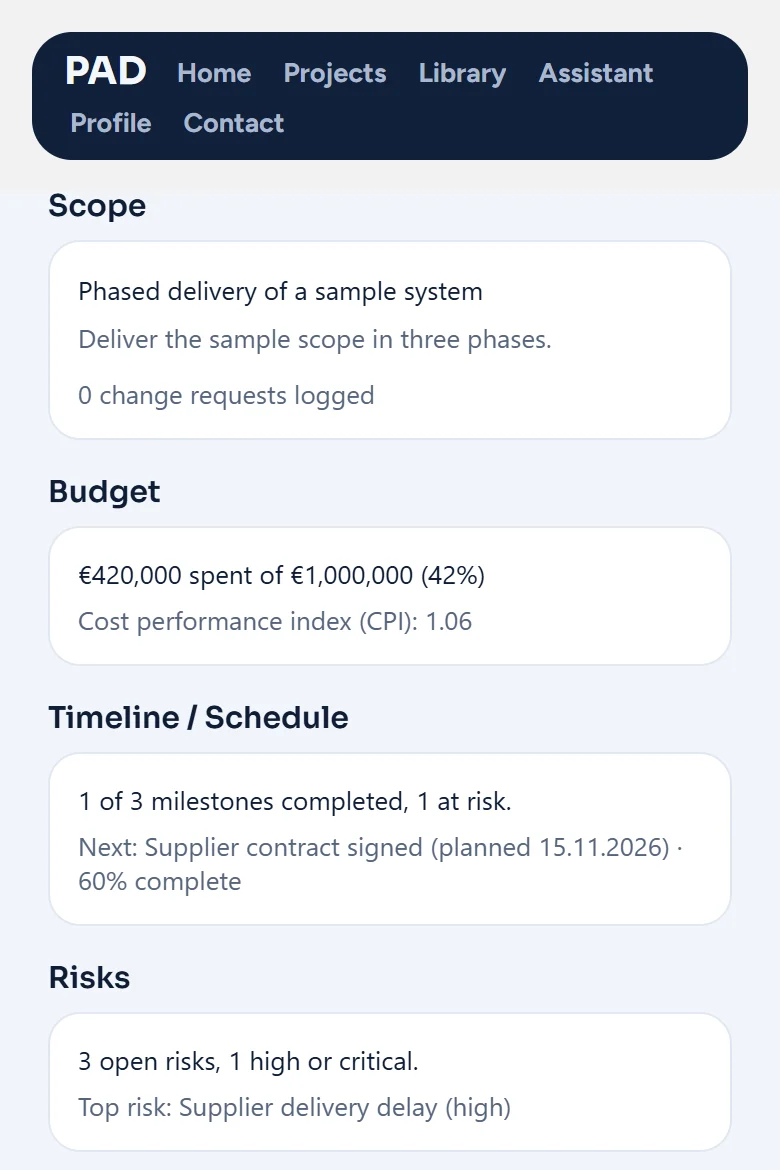
KPIs calculated for you
Overall health with SPI, CPI, CV and SV, worked out from your budget phases and planned dates.
Risks ranked on a 5 by 5 matrix
Rate probability and impact from 1 to 5. The highest exposure comes first.
Meetings at the top of the project
Add a Zoom or Microsoft Teams meeting with its link and passcode.
The weekly report is ready
The weekly status report is built from the project data you already keep.
Who is PAD for?
Anyone who runs or oversees projects.
Project managers
Keep KPIs, change requests, the risk assessment, meetings and files on one project, and open the weekly status report built from that project data.
Freelance project managers
Run each client as its own project with its own team and roles, give the client the Customer role so they see only what that role allows, and use the Projects list with At risk and On track filters across clients.
PMO managers
Every project uses the same 5 by 5 risk scoring, the same KPIs and the same weekly report layout, and the Projects list shows which projects are At risk or On track.
Product managers
Log each scope change as a change request with its schedule, cost and scope impact and its status, assess risks by probability and impact, and open the weekly status report.
Founders
Keep the budget, schedule and risks of each project in one place, invite people by link with a project role, and open the weekly status report built from your own project data.
Scrum Masters
Choose Scrum when you create the project and pick a 2 or 3 week sprint. The sprint card shows the current sprint, the scope and Definition of Done sit next to it, bugs are kept in their own list apart from risks, and the Jira product and sprint backlog buttons open your Jira boards.
Agile coaches
Run each team as its own project with the Agile method and the same sprint length, so every team shows the same KPIs, the same 5 by 5 risk assessment and the same sprint card. The Projects list shows which projects are At risk or On track.
Watch PAD in action
Three short videos show the app, a first project step by step, and a presentation with Laura, an AI generated fictional character. The screens are real PAD screens.
From project chaos to clarity
A project manager moves from scattered files to one workspace in PAD. See how to set up the team and roles, follow cost indicators and risks, keep the budget private, run a joint project with another company and plan Scrum meetings from daily scrum to retrospective. The screens are real PAD screens. Narrated in English.
A project manager’s working day
From the morning meeting to the weekly report, one day of a project manager who also writes code, with PAD opening before the inbox.
A project manager’s morning with PAD
Laura lands at nine and has a steering meeting at ten. She asks the Assistant what needs her attention and writes the weekly status report in one tap.
The screens in these videos are real PAD screens. Laura is an AI generated fictional character.
See all videosWhat teams say
Bütçe gizliliği ve partner etiketleme sistemi, çok paydaşlı projelerdeki en büyük operasyonel yükümüzü ortadan kaldırdı. Proje kontrolü artık çok daha şeffaf ve güvenli.See PAD with your team
Tell us about your projects and your team and we will arrange a meeting.